Showing posts with label C#.... Show all posts
Saturday, 1 March 2014
Saturday, 22 February 2014
Using Stacks to evaluate prefix notation expressions (Polish notation)
Prefix notation (for those that do not know), is a way of writing a mathematical expression without the use of parenthesis or brackets. Also known as "Polish notation" (which was created by Jan Ćukasiewicz to simplify sentential logic), it provides an easy way for computers to evaluate order of operations expressions without the use of brackets.
To start, a prefix notation example is “+34″, which would evaluate to 7 because the expression is 3+4, just in polish notation. Accordingly, there are a lot more examples of polish notation, and for the sample code posted, the algorithm will evaluate the prefix notation from a string array. In pseudo-code, the algorithm uses a stack to push and pop values in the expression and then evaluate according to the operator in the expression:
Code in C#:
class Program
{
static void Main(string[] args)
{
Stack<int> polishNotationStack = new Stack<int>();//a stack of type int
//the expression will be a string array
string[] expression = { "/", "*", "5", "+", "4", "3", "2" };//first, a prefix expression
for (int i = 0; i < expression.Length; i++)//we write the prefix expression
{
Console.Write(expression[i]);
}
int result;//a result to push onto the stack after an operation was done
Console.WriteLine();//newline space
Array.Reverse(expression);
//we reverse the expression to read in the characters from right to left
int n;
foreach (string c in expression)//for each string characcter in the array
{
if (int.TryParse(c, out n))//if the character can be converted to a number (operand)
{
polishNotationStack.Push(n);//push the number onto the stack
}
if (c == "+")//handling of operators
{
int x = polishNotationStack.Pop();
int y = polishNotationStack.Pop();
result = x + y;//evaluate the values popped from the stack
polishNotationStack.Push(result);//push current result onto the stack
}
if (c == "-")
{
int x = polishNotationStack.Pop();
int y = polishNotationStack.Pop();
result = x - y;
polishNotationStack.Push(result);
}
if (c == "*")
{
int x = polishNotationStack.Pop();
int y = polishNotationStack.Pop();
result = x * y;
polishNotationStack.Push(result);
}
if (c == "/")
{
int x = polishNotationStack.Pop();
int y = polishNotationStack.Pop();
result = x / y;
polishNotationStack.Push(result);
}
}
/*write the final result of the expression,
* which is at the top of the stack, so we use Peek()*/
Console.WriteLine("result of expression: {0}", polishNotationStack.Peek());
//Function();
Console.ReadLine();
}
To start, a prefix notation example is “+34″, which would evaluate to 7 because the expression is 3+4, just in polish notation. Accordingly, there are a lot more examples of polish notation, and for the sample code posted, the algorithm will evaluate the prefix notation from a string array. In pseudo-code, the algorithm uses a stack to push and pop values in the expression and then evaluate according to the operator in the expression:
Code in C#:
class Program
{
static void Main(string[] args)
{
Stack<int> polishNotationStack = new Stack<int>();//a stack of type int
//the expression will be a string array
string[] expression = { "/", "*", "5", "+", "4", "3", "2" };//first, a prefix expression
for (int i = 0; i < expression.Length; i++)//we write the prefix expression
{
Console.Write(expression[i]);
}
int result;//a result to push onto the stack after an operation was done
Console.WriteLine();//newline space
Array.Reverse(expression);
//we reverse the expression to read in the characters from right to left
int n;
foreach (string c in expression)//for each string characcter in the array
{
if (int.TryParse(c, out n))//if the character can be converted to a number (operand)
{
polishNotationStack.Push(n);//push the number onto the stack
}
if (c == "+")//handling of operators
{
int x = polishNotationStack.Pop();
int y = polishNotationStack.Pop();
result = x + y;//evaluate the values popped from the stack
polishNotationStack.Push(result);//push current result onto the stack
}
if (c == "-")
{
int x = polishNotationStack.Pop();
int y = polishNotationStack.Pop();
result = x - y;
polishNotationStack.Push(result);
}
if (c == "*")
{
int x = polishNotationStack.Pop();
int y = polishNotationStack.Pop();
result = x * y;
polishNotationStack.Push(result);
}
if (c == "/")
{
int x = polishNotationStack.Pop();
int y = polishNotationStack.Pop();
result = x / y;
polishNotationStack.Push(result);
}
}
/*write the final result of the expression,
* which is at the top of the stack, so we use Peek()*/
Console.WriteLine("result of expression: {0}", polishNotationStack.Peek());
//Function();
Console.ReadLine();
}
Thursday, 6 February 2014
Drawing by mouse on a PictureBox (Freehand drawing)
Brief overview of GDI+: Graphics Device Interface + (GDI+) is a graphical subsystem of Windows
that consists of an application programming interface (API) to display
graphics and formatted text on both video display and printer.
GDI+ acts as an intermediate layer between applications and device drivers for rendering two-dimensional graphics, images and text.
Suppose we wanted to create a sort of painting/freehand writing program that uses the mouse to draw. We can do this in .Net by first creating a Windows Forms application and then making a picturebox like so (adding a button to clear the picturebox is optional):
The code (in C#) is relatively simple to write. Theres many ways to accomplish freehand drawing by mouse, so this is just one way. The algorithm goes like this:
public partial class Form1 : Form
{
Point lastPoint = Point.Empty;//Point.Empty represents null for a Point object
bool isMouseDown = new Boolean();
public Form1()
{
InitializeComponent();
}
private void pictureBox1_MouseDown(object sender, MouseEventArgs e)
{
lastPoint = e.Location;//we assign the lastPoint to the current mouse position
isMouseDown = true;//we set to true because our mouse button is down (clicked)
}
private void pictureBox1_MouseMove(object sender, MouseEventArgs e)
{
if (isMouseDown == true)//check to see if the mouse button is down
{
if (lastPoint != null)//if our last point is not null, which in this case we have assigned above
{
if (pictureBox1.Image == null)
{
Bitmap bmp = new Bitmap(pictureBox1.Width, pictureBox1.Height);
pictureBox1.Image = bmp;
}
using (Graphics g = Graphics.FromImage(pictureBox1.Image))
{//we need to create a Graphics object to draw on the picture box, its our main tool
//when making a Pen object, you can just give it color only or give it color and pen size
g.DrawLine(new Pen(Color.Black, 2), lastPoint, e.Location);
g.SmoothingMode = SmoothingMode.AntiAliasing;
//this is to give the drawing a more smoother, less sharper look
}
pictureBox1.Invalidate();//refreshes the picturebox
lastPoint = e.Location;//keep assigning the lastPoint to the current mouse position
}
}
}
private void pictureBox1_MouseUp(object sender, MouseEventArgs e)
{
isMouseDown = false;
lastPoint = Point.Empty;
//set the previous point back to null if the user lets go of the mouse button
}
private void clearButton_Click(object sender, EventArgs e)//our clearing button
{
if (pictureBox1.Image != null)
{
pictureBox1.Image = null;
Invalidate();
}
}
}
GDI+ acts as an intermediate layer between applications and device drivers for rendering two-dimensional graphics, images and text.
Suppose we wanted to create a sort of painting/freehand writing program that uses the mouse to draw. We can do this in .Net by first creating a Windows Forms application and then making a picturebox like so (adding a button to clear the picturebox is optional):
The code (in C#) is relatively simple to write. Theres many ways to accomplish freehand drawing by mouse, so this is just one way. The algorithm goes like this:
- First, create the event handlers for the picture box: MouseDown, MouseMove, & MouseUp
- Create a previous Point object to store the current mouse position so that the any previous point will equal whatever position the mouse is on the picturebox (x,y) coordinates
- Create a boolean to detect whether the mouse button is currently pressed
- Create a Bitmap so that you have something to write/paint on if there is no existing Image/Bitmap on the picturebox
- Once you've created a bitmap, create a Graphics object to draw with, we will use the DrawLine() function, it takes a Pen object, a starting Point, and an ending Point
public partial class Form1 : Form
{
Point lastPoint = Point.Empty;//Point.Empty represents null for a Point object
bool isMouseDown = new Boolean();
public Form1()
{
InitializeComponent();
}
private void pictureBox1_MouseDown(object sender, MouseEventArgs e)
{
lastPoint = e.Location;//we assign the lastPoint to the current mouse position
isMouseDown = true;//we set to true because our mouse button is down (clicked)
}
private void pictureBox1_MouseMove(object sender, MouseEventArgs e)
{
if (isMouseDown == true)//check to see if the mouse button is down
{
if (lastPoint != null)//if our last point is not null, which in this case we have assigned above
{
if (pictureBox1.Image == null)
{
Bitmap bmp = new Bitmap(pictureBox1.Width, pictureBox1.Height);
pictureBox1.Image = bmp;
}
using (Graphics g = Graphics.FromImage(pictureBox1.Image))
{//we need to create a Graphics object to draw on the picture box, its our main tool
//when making a Pen object, you can just give it color only or give it color and pen size
g.DrawLine(new Pen(Color.Black, 2), lastPoint, e.Location);
g.SmoothingMode = SmoothingMode.AntiAliasing;
//this is to give the drawing a more smoother, less sharper look
}
pictureBox1.Invalidate();//refreshes the picturebox
lastPoint = e.Location;//keep assigning the lastPoint to the current mouse position
}
}
}
private void pictureBox1_MouseUp(object sender, MouseEventArgs e)
{
isMouseDown = false;
lastPoint = Point.Empty;
//set the previous point back to null if the user lets go of the mouse button
}
private void clearButton_Click(object sender, EventArgs e)//our clearing button
{
if (pictureBox1.Image != null)
{
pictureBox1.Image = null;
Invalidate();
}
}
}
Wednesday, 22 January 2014
OOP Demo: Abstract Classes, Inheritance, Polymorphism, Encapsulation
In OOP, an abstract class is a class object that acts as the base/main class for all other classes to inherit from. In an abstract class, there is no implementation allowed, only declaration. Also, even if you make a constructor inside an abstract class, creating an instance of an abstract class is not allowed (i.e. if you try and do this, you will get compiler errors: A newObject = new A(); where A is an abstract class)
An abstract class is simply that of its namesake, its abstract. There's nothing specific about it, but it will have properties and functions that other classes can use/have a relationship to the base abstract class object.
The following code shows an abstract class named Shape, with subclasses Square, Triangle, and Circle, who all use inheritance to inherit 1 function from the abstract class. All the subclasses will use the single function called 'CalculateArea()' where the polymorphism comes in.
Polymorphism in a plain definition, is a function that can do different things depending on whichever class is using it. In other words: one function, many uses. In the example below, all objects implement a CalculateArea() function, note that finding the area for different shapes, the implementation is different, but the function name stays the same.
Encapsulation is simply protecting any properties, functions, or that is subject to change from outside code. We can also create a class object within a class object to hide an object from outside access that don't need to use the object. In the example below, we give properties like length and width of a square to be private so that when we declare a Square object, we initialize using the public constructor like so: Shape square = new Square(l, w);
abstract class Shape//this abstract Shape class is our base class to inherit from
{//abstract classes are created by using the 'abstract' keyword
public abstract int CalculateArea();
/*abstract classes may or may not have abstract functions/fields, in this case we'll make an abstract function called CalculateArea, and please look closely at the syntax in C#, if you're doing Java it can be different.*/
}
//we have a subclass called Square with its own unique characteristics, it inherits from Shape
class Square : Shape
{
private int length;
private int width;
public Square() { }//empty constructor
public Square(int length, int width)//overloading, we will pass in a length & width
{
this.length = length;
this.width = width;
}
public override int CalculateArea()//pay close attention here: any functions inherited from an abstract or virtual class MUST contain the 'override' keyword
{
int area = this.length * this.width;
return area;//and must return the same type
}
}
//the same routine is done for the next classes that inherit from Shape
class Triangle : Shape
{
private int baseLength;
private int height;
public Triangle() { }
public Triangle(int baseLength, int height)
{
this.baseLength = baseLength;
this.height = height;
}
public override int CalculateArea()
{
int area = this.baseLength * this.height / 2;
return area;
}
}
class Circle : Shape
{
private double radius;
public Circle() { }
public Circle(double r)
{
this.radius = r;
}
public override int CalculateArea()
{
int area = (int)(Math.Pow(this.radius, 2) * Math.PI);
return area;
}
}
class Program
{
static void Main()
{
//we create new objects of type shape and we initialise with a specific shape
Shape square = new Square(5,10);
//so a Shape called square is initialised by giving by saying new Square(length, width)
//we do this because we want to create a new Shape and calculate its area by specifying that its a //square
//the same is done for the triangle and circle
Shape triangle = new Triangle(10, 32);
Shape circle = new Circle(7);
//we write out the areas of the shapes created
Console.WriteLine("Area of square: {0} units", square.CalculateArea());
Console.WriteLine("Area of triangle: {0} units", triangle.CalculateArea());
Console.WriteLine("Area of circle: {0} units", circle.CalculateArea());
Console.ReadLine();//keep the window open
}
}
An illustration the hierarchy:
An abstract class is simply that of its namesake, its abstract. There's nothing specific about it, but it will have properties and functions that other classes can use/have a relationship to the base abstract class object.
The following code shows an abstract class named Shape, with subclasses Square, Triangle, and Circle, who all use inheritance to inherit 1 function from the abstract class. All the subclasses will use the single function called 'CalculateArea()' where the polymorphism comes in.
Polymorphism in a plain definition, is a function that can do different things depending on whichever class is using it. In other words: one function, many uses. In the example below, all objects implement a CalculateArea() function, note that finding the area for different shapes, the implementation is different, but the function name stays the same.
Encapsulation is simply protecting any properties, functions, or that is subject to change from outside code. We can also create a class object within a class object to hide an object from outside access that don't need to use the object. In the example below, we give properties like length and width of a square to be private so that when we declare a Square object, we initialize using the public constructor like so: Shape square = new Square(l, w);
abstract class Shape//this abstract Shape class is our base class to inherit from
{//abstract classes are created by using the 'abstract' keyword
public abstract int CalculateArea();
/*abstract classes may or may not have abstract functions/fields, in this case we'll make an abstract function called CalculateArea, and please look closely at the syntax in C#, if you're doing Java it can be different.*/
}
//we have a subclass called Square with its own unique characteristics, it inherits from Shape
class Square : Shape
{
private int length;
private int width;
public Square() { }//empty constructor
public Square(int length, int width)//overloading, we will pass in a length & width
{
this.length = length;
this.width = width;
}
public override int CalculateArea()//pay close attention here: any functions inherited from an abstract or virtual class MUST contain the 'override' keyword
{
int area = this.length * this.width;
return area;//and must return the same type
}
}
//the same routine is done for the next classes that inherit from Shape
class Triangle : Shape
{
private int baseLength;
private int height;
public Triangle() { }
public Triangle(int baseLength, int height)
{
this.baseLength = baseLength;
this.height = height;
}
public override int CalculateArea()
{
int area = this.baseLength * this.height / 2;
return area;
}
}
class Circle : Shape
{
private double radius;
public Circle() { }
public Circle(double r)
{
this.radius = r;
}
public override int CalculateArea()
{
int area = (int)(Math.Pow(this.radius, 2) * Math.PI);
return area;
}
}
class Program
{
static void Main()
{
//we create new objects of type shape and we initialise with a specific shape
Shape square = new Square(5,10);
//so a Shape called square is initialised by giving by saying new Square(length, width)
//we do this because we want to create a new Shape and calculate its area by specifying that its a //square
//the same is done for the triangle and circle
Shape triangle = new Triangle(10, 32);
Shape circle = new Circle(7);
//we write out the areas of the shapes created
Console.WriteLine("Area of square: {0} units", square.CalculateArea());
Console.WriteLine("Area of triangle: {0} units", triangle.CalculateArea());
Console.WriteLine("Area of circle: {0} units", circle.CalculateArea());
Console.ReadLine();//keep the window open
}
}
An illustration the hierarchy:
Tuesday, 21 January 2014
Insertion Sort Demo
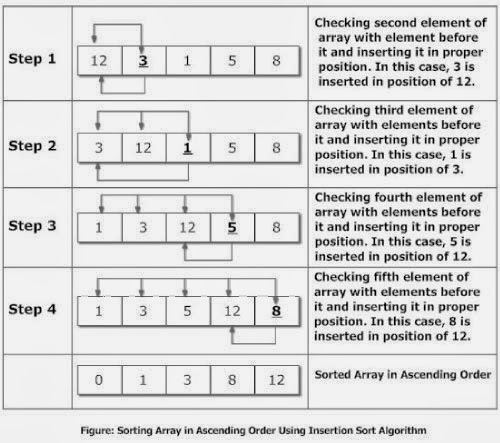
The insertion sort is another sorting algorithm. Just like the Bubble Sort, it has a very simple implementation and its easy to be able to see whats going on. While it can be more efficient than the Bubble Sort, it is not recommended to handle sorting large amounts of data (depending on size). For large amounts of data, a Merge Sort, Quick Sort, or the Heap Sort is most appropriate.
The sorting process is as follows:
- Best case scenario for this algorithm is O(n) where n=1, so only 1 swap is done, Average case and Worst case scenario is O(n^2)
- An example of a worst case scenario is when the collection is in reverse order (like 5,4,3,2,1), a best case scenario is when the collection is already sorted or only 1 swap needs to be done (like 1,2,3,5,4), and average case is where the collection is completely unsorted (like 2,5,1,4,3)
class Program
{
static void Main(string[] args)
{
Console.WriteLine("Unsorted:");
int[] collection = { 3, 5, 64, 1, 9, 7, 11, 23, 50 };
for (int i = 0; i < collection.Length; i++)
{//first lets write the collection before its sorted
Console.Write("{0} ", collection[i]);
}
Console.WriteLine();
//here begins the insertion sort
int temp;
int x;
for (int i = 0; i < collection.Length; i++)
{
temp = collection[i];
/*temp is equal to the first index of the array,
* so when i = 1, temp will equal the value of whichever
* index the array has for position 1, so if position 1 contains the number 7, temp = 7*/
x = i - 1;//variable x is equal to i - 1, which will be used in the comparision statement below
/*while x is greater than or equal to 0 AND temp is less than the current index of the array */
while (x >= 0 && temp < collection[x])
{
collection[x + 1] = collection[x];//make the swap
x--;
/*move down the collection, we start at position 1 of the array,
* but we subtract until we're at the end of the array (the end position of an array is
* written as Length - 1).*/
}
collection[x + 1] = temp;//swap completed
}
Console.WriteLine("Sorted!");
for (int i = 0; i < collection.Length; i++)//re-write the collection array to the console window
{
Console.Write("{0} ", collection[i]);
}
Console.ReadLine();
}
}
Illustrations of the algorithm:Monday, 20 January 2014
Binary Search Demo
Binary search is another well known searching algorithm. In plain terms, a binary search starts at the midpoint of a list or collection and compares a search term or key with the midpoint term, so in example:
List = 1, 4, 6, 8, 10, 18, 32 Value to look for: X = 4
First run: compare X with 8 (the middle value). Its smaller, repeat search with 1, 4, 6
Second run: compare X with 6. Its smaller, repeat with 1, 4
Third run: compare X with 4. Search is done, we have found 4.
class Program
{
static void Main()
{
int[] collection = { 1, 3, 5, 7, 9, 11, 21 }; //our collection is already sorted
for (int i = 0; i < collection.Length; i++)
{
Console.Write("{0} ", collection[i]);
}//first, we write all the elements of the collection on the window so we can see the list
Console.WriteLine();
Console.Write("Enter a value to search for in the collection: ");
int searchKey = int.Parse(Console.ReadLine());
int middle;
int maximum = collection.Length;
int minimum = 0;
while (minimum <= maximum)
{
middle = (maximum + minimum) / 2;
if (collection[middle] == searchKey)
{
Console.WriteLine("\nElement {0} was found at position {1} in the collection!", searchKey, middle);
break;
}
else if (collection[middle] > searchKey)
{
maximum = middle - 1;
}
else if (collection[middle] < searchKey)
{
minimum = middle + 1;
}
else
{
Console.WriteLine("The value does not exist");
break;
}
}
Console.ReadLine();
}
}
Further illustrations:
List = 1, 4, 6, 8, 10, 18, 32 Value to look for: X = 4
First run: compare X with 8 (the middle value). Its smaller, repeat search with 1, 4, 6
Second run: compare X with 6. Its smaller, repeat with 1, 4
Third run: compare X with 4. Search is done, we have found 4.
- The Binary search has O(log(n)) complexity, making it more efficient in the long run with larger data collections unlike the Linear Sort which is more desirable with smaller, unsorted data collections. Its O(log(n)) because it halves the number of items to search with each iteration
- For a binary search to begin, the collection MUST be sorted first and foremost
class Program
{
static void Main()
{
int[] collection = { 1, 3, 5, 7, 9, 11, 21 }; //our collection is already sorted
for (int i = 0; i < collection.Length; i++)
{
Console.Write("{0} ", collection[i]);
}//first, we write all the elements of the collection on the window so we can see the list
Console.WriteLine();
Console.Write("Enter a value to search for in the collection: ");
int searchKey = int.Parse(Console.ReadLine());
int middle;
int maximum = collection.Length;
int minimum = 0;
while (minimum <= maximum)
{
middle = (maximum + minimum) / 2;
if (collection[middle] == searchKey)
{
Console.WriteLine("\nElement {0} was found at position {1} in the collection!", searchKey, middle);
break;
}
else if (collection[middle] > searchKey)
{
maximum = middle - 1;
}
else if (collection[middle] < searchKey)
{
minimum = middle + 1;
}
else
{
Console.WriteLine("The value does not exist");
break;
}
}
Console.ReadLine();
}
}
Further illustrations:
Linear Search (searching through a text file)
The linear search is a very simple searching algorithm. The way it works is that it starts from the beginning of an Array or List<T> and goes through checking whether the given value or object exists in a data structure.
For example, a linear search is very similar to looking in a phonebook, and you start with section 'A' and look and look until you find the exact number you're looking for. The Linear Search has O(n) time complexity, so its recommended to use with smaller collections rather than large collections. With larger collections a binary search is more efficient, which will be the topic of my next post.
The following code is a linear search made to search a text file for a certain term the user enters.
class Program
{
static void Main()
{
DisplayTweets();//this method is called so that when the application loads, the lines of text get displayed automatically.
//the method that is called above is important because if the file has been opened in another part of the program, we can open it in this part and search and write tweets.
//if I load once in Main, I cannot load the file again in this part of the program. There is a way around it, but for now, calling this method is simple.
// File.OpenText allows us to read the contents of a file by establishing
// a connection to a file stream associated with the file.
StreamReader reader = File.OpenText("textfile.txt");//reading from "tweets.txt" in bin/debug
Console.WriteLine();
// We can now read data from the file using ReadLine.
String searchingLine = reader.ReadLine();
Console.Write("\n\nEnter a search term to display all lines containing the term: ");
//prompt the user to enter a search term to look for in the text file
string searchTerm = Console.ReadLine();
while (searchingLine != null)
{
// We can use String.Split to separate a line of data into fields.
String[] lineArray = searchingLine.Split(' ');
//we assign a string array for each line read in the text file so that when we read in a line, its stored in an array
for (int x = 0; x < lineArray.Length; x++)//because name is already stored at the first index (0), that can only mean that the entire tweet is stored
{
//therefore, a for loop has to be used to go through the entire line, and check, if any index in lineArray //== the search term
if (lineArray[x] == searchTerm)
{
Console.WriteLine();//adding a writeline here forces every line of text to be printed on a new line
for (int i = 0; i < searchingLine.Length; i++)
{//go though the searchingLine and write out the entire tweet.
Console.Write("{0}", searchingLine[i].ToString());
}
}
}
searchingLine = reader.ReadLine();
}
Console.ReadLine();//keep the window open
}
static void DisplayTweets()//this method will do one thing only: display all the text in the file
{
//this is only a simple function, it does not return anything, so it is void
StreamReader reader = File.OpenText("textfile.txt");
String line = reader.ReadLine();
using (StreamReader alternateReader = File.OpenText("textfile.txt"))
{
line = alternateReader.ReadLine();
while (line != null)
{
Console.WriteLine("{0}", line);
line = alternateReader.ReadLine();
}
}
}
For example, a linear search is very similar to looking in a phonebook, and you start with section 'A' and look and look until you find the exact number you're looking for. The Linear Search has O(n) time complexity, so its recommended to use with smaller collections rather than large collections. With larger collections a binary search is more efficient, which will be the topic of my next post.
The following code is a linear search made to search a text file for a certain term the user enters.
class Program
{
static void Main()
{
DisplayTweets();//this method is called so that when the application loads, the lines of text get displayed automatically.
//the method that is called above is important because if the file has been opened in another part of the program, we can open it in this part and search and write tweets.
//if I load once in Main, I cannot load the file again in this part of the program. There is a way around it, but for now, calling this method is simple.
// File.OpenText allows us to read the contents of a file by establishing
// a connection to a file stream associated with the file.
StreamReader reader = File.OpenText("textfile.txt");//reading from "tweets.txt" in bin/debug
Console.WriteLine();
// We can now read data from the file using ReadLine.
String searchingLine = reader.ReadLine();
Console.Write("\n\nEnter a search term to display all lines containing the term: ");
//prompt the user to enter a search term to look for in the text file
string searchTerm = Console.ReadLine();
while (searchingLine != null)
{
// We can use String.Split to separate a line of data into fields.
String[] lineArray = searchingLine.Split(' ');
//we assign a string array for each line read in the text file so that when we read in a line, its stored in an array
for (int x = 0; x < lineArray.Length; x++)//because name is already stored at the first index (0), that can only mean that the entire tweet is stored
{
//therefore, a for loop has to be used to go through the entire line, and check, if any index in lineArray //== the search term
if (lineArray[x] == searchTerm)
{
Console.WriteLine();//adding a writeline here forces every line of text to be printed on a new line
for (int i = 0; i < searchingLine.Length; i++)
{//go though the searchingLine and write out the entire tweet.
Console.Write("{0}", searchingLine[i].ToString());
}
}
}
searchingLine = reader.ReadLine();
}
Console.ReadLine();//keep the window open
}
static void DisplayTweets()//this method will do one thing only: display all the text in the file
{
//this is only a simple function, it does not return anything, so it is void
StreamReader reader = File.OpenText("textfile.txt");
String line = reader.ReadLine();
using (StreamReader alternateReader = File.OpenText("textfile.txt"))
{
line = alternateReader.ReadLine();
while (line != null)
{
Console.WriteLine("{0}", line);
line = alternateReader.ReadLine();
}
}
}
Sunday, 19 January 2014
Trees
Trees are another well known data structure. Again, they use the Node object and basically, a tree node will always one root node that has a link to 2 other nodes (usually left and right) and then when the tree grows in size, the left or right nodes become parent nodes. To illustrate:
So in the diagram(s) above, we see that there will always be one node that acts as the root node (a node that is considered to be the starting point, so no parent nodes for the root) to the child nodes (left and right), and when there are more items added onto the tree, those child nodes becomes parent nodes and so forth. They can have a reference to either 1 child node or two. These are called binary trees. There's other kinds of trees, but for now, we will focus on this kind, as they are most commonly used.
Trees are useful in that you can use them to create a mock system directory/folder hierarchy of sorts. Or you just use them to sort your data out. Printing a tree structure requires some recursion because we want to access all the nodes of the tree, so going up and down the tree requires it. Best case scenario, they have O(log(n)) complexity when you're doing searching through a binary tree.
My implementation in C# (again you can use the same code in Java):
class TreeNode
{
public int data;
public TreeNode left { get; set; }
public TreeNode right { get; set; }
public TreeNode(int data)
{
this.data = data;
}
}
class Tree
{
public TreeNode root;//this is public so we can access this treenode from main when we display our tree using the recursive function
private int itemCount;
public Tree()
{
root = null;
itemCount = 0;
}
public void insert(int data)
{
TreeNode newItem = new TreeNode(data);//our new node to insert into the tree
if (root == null)//if theres no root, make the first new node the root
{
root = newItem;
}
else
{
TreeNode current = root;//we make a new treenode called current and assign to the root, so we start iteration from there
TreeNode parent = null;
while (current != null)//while the current is not equal to null (since we have it equal to root)
{
parent = current;//set the parent node to point to current (which the root treenode, which will be the parent to the new item treenode)
if (data < current.data)
//if new item (data) is less than the current node's data, link it to the left node
{
current = current.left;
if (current == null)//if the current.left is null
{
parent.left = newItem;//make parent.left store the new node
}
}
else
{
current = current.right;
if (current == null)
{
parent.right = newItem;
}
}
itemCount++;
}
}
}
public void InOrderRecursiveTreeDisplay(TreeNode root)
{
if (root != null)
{
InOrderRecursiveTreeDisplay(root.left);
Console.Write("({0})", root.data);
InOrderRecursiveTreeDisplay(root.right);
}
}
public bool RecursiveFindValue(TreeNode root, int data)
{
if (root != null)
{
RecursiveFindValue(root.left, data);
RecursiveFindValue(root.right, data);
if (root.data == data)
{
Console.WriteLine("Value exists!");
return true;
}
}
return false;
}
}
class Program
{
static void Main()
{
Tree t = new Tree();
t.insert(5);
t.insert(3);
t.insert(9);
t.insert(1);
t.insert(4);
t.insert(8);
t.insert(10);
Console.WriteLine("\nTree (inorder)");
t.InOrderRecursiveTreeDisplay(t.root);
Console.WriteLine();
t.RecursiveFindValue(t.root, 1);
Console.ReadLine();
}
So in the diagram(s) above, we see that there will always be one node that acts as the root node (a node that is considered to be the starting point, so no parent nodes for the root) to the child nodes (left and right), and when there are more items added onto the tree, those child nodes becomes parent nodes and so forth. They can have a reference to either 1 child node or two. These are called binary trees. There's other kinds of trees, but for now, we will focus on this kind, as they are most commonly used.
Trees are useful in that you can use them to create a mock system directory/folder hierarchy of sorts. Or you just use them to sort your data out. Printing a tree structure requires some recursion because we want to access all the nodes of the tree, so going up and down the tree requires it. Best case scenario, they have O(log(n)) complexity when you're doing searching through a binary tree.
My implementation in C# (again you can use the same code in Java):
class TreeNode
{
public int data;
public TreeNode left { get; set; }
public TreeNode right { get; set; }
public TreeNode(int data)
{
this.data = data;
}
}
class Tree
{
public TreeNode root;//this is public so we can access this treenode from main when we display our tree using the recursive function
private int itemCount;
public Tree()
{
root = null;
itemCount = 0;
}
public void insert(int data)
{
TreeNode newItem = new TreeNode(data);//our new node to insert into the tree
if (root == null)//if theres no root, make the first new node the root
{
root = newItem;
}
else
{
TreeNode current = root;//we make a new treenode called current and assign to the root, so we start iteration from there
TreeNode parent = null;
while (current != null)//while the current is not equal to null (since we have it equal to root)
{
parent = current;//set the parent node to point to current (which the root treenode, which will be the parent to the new item treenode)
if (data < current.data)
//if new item (data) is less than the current node's data, link it to the left node
{
current = current.left;
if (current == null)//if the current.left is null
{
parent.left = newItem;//make parent.left store the new node
}
}
else
{
current = current.right;
if (current == null)
{
parent.right = newItem;
}
}
itemCount++;
}
}
}
public void InOrderRecursiveTreeDisplay(TreeNode root)
{
if (root != null)
{
InOrderRecursiveTreeDisplay(root.left);
Console.Write("({0})", root.data);
InOrderRecursiveTreeDisplay(root.right);
}
}
public bool RecursiveFindValue(TreeNode root, int data)
{
if (root != null)
{
RecursiveFindValue(root.left, data);
RecursiveFindValue(root.right, data);
if (root.data == data)
{
Console.WriteLine("Value exists!");
return true;
}
}
return false;
}
}
class Program
{
static void Main()
{
Tree t = new Tree();
t.insert(5);
t.insert(3);
t.insert(9);
t.insert(1);
t.insert(4);
t.insert(8);
t.insert(10);
Console.WriteLine("\nTree (inorder)");
t.InOrderRecursiveTreeDisplay(t.root);
Console.WriteLine();
t.RecursiveFindValue(t.root, 1);
Console.ReadLine();
}
Labels:
C#...,
Data Structures,
Java,
Searching & Sorting
Friday, 17 January 2014
Queues and Linked Lists...
Again, we come back to different types of data structures. A Linked List is essentially a "chain" of sorts, you can add objects, delete objects, move objects; i.e. the list can grow or shrink to any size, removing the restrictions that an Array based implementation would have. Its one of the most used and known data structures. To illustrate even further:
Node Class:
class Node//this node class will be used for both the queue and linked list classes
{
public int data { get; set; }
public Node next { get; set; }
public Node(int data)
{
this.data = data;
next = null;
}
}
Linked List:
class LinkedList
{
private Node first;
private Node last;
private int listCount = 0;
public LinkedList() { }
public void AddItem(int data)//we will pass in an integer to the AddItem function enter in the linkedlist
{
Node newItem = new Node(data);
if (first == null)
{
first = newItem;
last = first;
}
else
{
Node traverse = first;
while (traverse.next != null)//go through the linked list to find the last node of the list and add a pointer to the new item
{
traverse = traverse.next;
}
traverse.next = newItem;//adds the new item and makes the last part of the list point the new item
last = traverse.next;
}
listCount++;
}
public void RemoveFirst()//we have RemoveFirst() function to remove the first node
{
Node newFirst = first.next;//set a node to equal the next node in the list
first = null;//set the current first node to equal null
first = newFirst;//set the next node to be the first
listCount--;
DisplayList();
}
public void RemoveLast()//we also have a RemoveLast() function to remove the last node
{
int index = 1;
//if we are removing from the back, traverse the list until the last node = traversal and set to null
Node traversal = first;
while (traversal.next != null)
{
traversal = traversal.next;
index++;
if (index == listCount - 1)
{
break;
//break from the loop when the index reaches length-1
//we do this so that the penultimate item in the list becomes the new last node
}
}
last = traversal;//set last to equal the current traversal node (penultimate)
traversal.next = null;//set the next node to null
listCount--;//decrement the number of items inside the list
DisplayList();//re-write the list
}
public void RemoveItem(int removeValue)
{//the RemoveItem function takes an int parameter, so that it finds something to delete
//to remove an item...
//traverse the list
//set a node called nextnext
//assign the nextnext to the current traversal node.next.next
//it looks like this:
//node->current->next->nextnext
//if we delete a middle node
//we look to the next nodes data
//if it checks out, set to null
//set the current node.next (traversal) to nextnext
//it will link the current traversal node to nextnext
//like so: A->B->tranversal(current)->traversal.next (middle)->traversal.next.next (nextnext)
//becomes: A->B->Current->nextnext
Node traversal = first;//a node to traverse the list
Node nextnext = null;
while (traversal.next != null)
{
nextnext = traversal.next.next;
if (traversal.next.data == removeValue)
{
traversal.next = null;
traversal.next = nextnext;
break;
}
else
{
traversal = traversal.next;
}
}
listCount--;//decrement the number of list items
DisplayList();//re-write the list
}
public void DisplayList()
{
Node current = first;
while (current != null)
{
Console.WriteLine("{0} ", current.data);
current = current.next;
if (current == null)
{
return;
}
}
}
}
The same goes for a Queue. A Queue is like a Stack, however, its based on a First In First Out algorithm. So if add an object called "numberOne" to a queue, and I add another object called "numberX", when I go to DeQueue(which to take an object out of the queue), the first object that will DeQueue is "numberOne".
We can create a Queue when we are "using System.Collections;" by simply typing: Queue<Type> nameOfQueue = new Queue<Type>();
If we wanted to do a manual implementation of a Queue using Linked Lists, here is my version of the data structure...
Queue:
class Queue
{
private Node head;
private Node end;
private int itemCount = 0;
public Queue() { head = end = null;}
public void Enqueue(int data)//we add an item to the back of the queue
{
Node n = new Node(data);
if (head == null)//if theres nothing in the first place, we make the new node both the head and end of the queue
{
head = n;
end = head;
}
else
{
end.next = n;
end = end.next;
}
itemCount++;
}
public int Dequeue()//we will return the first value that was enqueued in the queue
{
if (head == null)
{
throw new IndexOutOfRangeException(); //if theres no head of in the queue
}
else
{
int val = head.data;
head = head.next;
itemCount--;
return val;
}
}
public void DisplayQueue()//to display the items of the queue in order, we dequeue and write
{//this function also tests our Dequeuing function
int i = 0;
while (i <= itemCount)
{
Console.Write("{0} ", Dequeue());
if (i == itemCount)
{
break;
}
}
}
}
A short and fast Xna game in 60 minutes...
In my past experience I have played around with XNA and basically made simple games and even made it so that my games used a controller and all that. For some who just want to dive straight into XNA game dev, this is a great tutorial found on the msdn site: http://msdn.microsoft.com/en-us/library/bb975644%28v=xnagamestudio.31%29.aspx
Thursday, 16 January 2014
Short intro to LINQ
LINQ is a tool that is used to work with databases or servers, linking the world of objects with data. LINQ: (Language-Integrated Query) , can be used in C# and can be quite simple to work with in terms of syntax.
A basic example of LINQ in action is:
//All LINQ query operations consist of three distinct actions:
//Obtain the data source.
//Create the query.
//Execute the query.
// The Three Parts of a LINQ Query:
// 1. Data source.
int[] numbers = new int[7] { 0, 1, 2, 3, 4, 5, 6 };
// 2. Query creation. This is the actual query by itself.
// numQuery is an IEnumerable<int>
var numQuery =
from num in numbers
//num is an int variable that defines the range, and search in the integer array
where (num % 2) == 0//heres the condition, this says to only write even numbers
select num;//select those and write (i.e. assign values to num and write)
// 3. Query execution.
foreach (int num in numQuery)
{
Console.Write("{0,1} ", num);
}
So not that bad in terms of syntax. Basically:
If you're working with an external data source:
//like text files, or databases...
XElement x = new XElement(@"C:\data.xml");//a data source
// Query for customers in London.
IQueryable<Customer> custQuery =
from cust in x.Customers
where cust.City == "London"
select cust;
Console.ReadLine();
A basic example of LINQ in action is:
//All LINQ query operations consist of three distinct actions:
//Obtain the data source.
//Create the query.
//Execute the query.
// The Three Parts of a LINQ Query:
// 1. Data source.
int[] numbers = new int[7] { 0, 1, 2, 3, 4, 5, 6 };
// 2. Query creation. This is the actual query by itself.
// numQuery is an IEnumerable<int>
var numQuery =
from num in numbers
//num is an int variable that defines the range, and search in the integer array
where (num % 2) == 0//heres the condition, this says to only write even numbers
select num;//select those and write (i.e. assign values to num and write)
// 3. Query execution.
foreach (int num in numQuery)
{
Console.Write("{0,1} ", num);
}
So not that bad in terms of syntax. Basically:
- Get a data source
- create something to search, for example, int x = from here incollection, give a condition like (number must be so and so), then once it matches condition, select, and retrieve
If you're working with an external data source:
//like text files, or databases...
XElement x = new XElement(@"C:\data.xml");//a data source
// Query for customers in London.
IQueryable<Customer> custQuery =
from cust in x.Customers
where cust.City == "London"
select cust;
Console.ReadLine();
Recursion, a quick example
Most people look at Recursion as something scary and unknown. Recursion is simply when a function calls itself again and again until the problem gets smaller and smaller to solve until its done, or when a problem meets a given condition.
To explain a bit more, a clear example of recursion is finding a factorial of a number.
[or in plain terms: 5! is 5*4*3*2*1]
We can use recursion to create a factorial program that computes the factorial of an integer entered.
And as always, you can use this code in Java since syntax is similar.
class factorial//we have an object called factorial that will contain all the functions/properties
{
public int result(int val)//our primary function
{
int answer;
if (val == 1)//if the value is just 1, 1!=1 so return 1
{
return 1;
}
else
{
answer = result(val - 1) * val; /* method result is call to it self*/
/*here is how answer works: factorial is basically n*(n-1)*(n-2)...*1, so each time its
called the value decreases by 1 as its multiplied by the previous value */
return answer; //we return answer
}
}
}
class Program
{
static void Main()
{
Console.WriteLine("Factorial with Recursion");
factorial factorial = new factorial();
Console.Write("Enter a value to find its factorial: ");
int f = int.Parse(Console.ReadLine());
Console.WriteLine("Result: {0}",factorial.result(f));
Console.ReadLine();
}
}
To get a closer look into whats happening when we call the function, here is an illustration:
Example: int val = 4; So we want to find 4!
1st call: answer = result(4-1)*4 so we have 4*(3)<-- '(3) is the result we get from the function'
2nd call:answer = result(3-1)*(4-1)*4 so we have 4*(3(2))
3rd call: answer = result(2-1)*(3-1)*(4-1)*4 so we have 4*(3(2(1)))
and we would get an answer of 24.
So to conclude, Recursion helps us solve problems where its better to use it. In data structures such as Trees, its used a lot to print out a tree or sort or find something within the Tree structure. In the grand scheme of things, nobody really has to fully understand Recursion but really just playing around with it helps a lot, its a complex concept.
To explain a bit more, a clear example of recursion is finding a factorial of a number.
[or in plain terms: 5! is 5*4*3*2*1]
We can use recursion to create a factorial program that computes the factorial of an integer entered.
And as always, you can use this code in Java since syntax is similar.
class factorial//we have an object called factorial that will contain all the functions/properties
{
public int result(int val)//our primary function
{
int answer;
if (val == 1)//if the value is just 1, 1!=1 so return 1
{
return 1;
}
else
{
answer = result(val - 1) * val; /* method result is call to it self*/
/*here is how answer works: factorial is basically n*(n-1)*(n-2)...*1, so each time its
called the value decreases by 1 as its multiplied by the previous value */
return answer; //we return answer
}
}
}
class Program
{
static void Main()
{
Console.WriteLine("Factorial with Recursion");
factorial factorial = new factorial();
Console.Write("Enter a value to find its factorial: ");
int f = int.Parse(Console.ReadLine());
Console.WriteLine("Result: {0}",factorial.result(f));
Console.ReadLine();
}
}
To get a closer look into whats happening when we call the function, here is an illustration:
Example: int val = 4; So we want to find 4!
1st call: answer = result(4-1)*4 so we have 4*(3)<-- '(3) is the result we get from the function'
2nd call:answer = result(3-1)*(4-1)*4 so we have 4*(3(2))
3rd call: answer = result(2-1)*(3-1)*(4-1)*4 so we have 4*(3(2(1)))
and we would get an answer of 24.
So to conclude, Recursion helps us solve problems where its better to use it. In data structures such as Trees, its used a lot to print out a tree or sort or find something within the Tree structure. In the grand scheme of things, nobody really has to fully understand Recursion but really just playing around with it helps a lot, its a complex concept.
Wednesday, 15 January 2014
Stack implementation using Arrays & Linked Lists
In C#, you can use a Stack object to store your data simply by using System.Collections and then making a new declaration of a generic Stack object to work with various objects like integers or strings like so: Stack s = new Stack(); and you would add items by using the .Push() method and retrieve items using the .Pop() method.
Respectively, in order effectively see what goes on "under the hood", we make our own Stack object using Arrays. So, my version of both the Array and LinkedList implementation is shown below.
On a related note, a Stack would be most useful if you were going to implement a Undo/Redo functionality of a program or if you wanted to make a Towers Of Hanoi game like this one:
Array Implementation:Respectively, in order effectively see what goes on "under the hood", we make our own Stack object using Arrays. So, my version of both the Array and LinkedList implementation is shown below.
On a related note, a Stack would be most useful if you were going to implement a Undo/Redo functionality of a program or if you wanted to make a Towers Of Hanoi game like this one:
- Stacks are First in Last out, Last in First Out (LIFO)
- Linked List representation is also another option
- Our main functions of our Stack class will be Push(), Pop(), isEmpty(), Peek(), and Display()
- Again, you can also borrow this code for use with Java since syntax is similar.
class Stack
{
private int[] arr;
private int index;
public Stack(int size)
{
arr = new int[size];
index = -1;
}
public void Push(int value)//inserts an object or value onto the stack
{
index++;
arr[index] = value;
}
public int Pop()//removes the object or value at the top of the stack
{
int val;
if (isEmpty())
{
return 0;
}
else
{
val = arr[index--];
return val;
}
}
public bool isEmpty()//to check if the stack is empty
{
if (arr.Length >= 1)
{
return false;
}
else
{
return true;
}
}
public void DisplayStack()//this is our display stack function, it prints from the top to the bottom
{
for (int i = arr.Length-1; i <= arr.Length; i--)
{
Console.WriteLine(arr[i]);
if (i < 1)
{
break;
}
}
}
public int Peek()//Peek returns the value that is at the top of the stack
{
return arr[index];
}
}
class Program
{
static void Main()
{
Stack s = new Stack(5);
//our stack size is going to be 5 spaces, user can also set the size to be custom as well
s.Push(1);
s.Push(2);
s.Push(3);
s.Push(4);
s.Push(5);
s.DisplayStack();//we write out our stack
int poppedValue = s.Pop();//we pop a value from the stack
//displaying our value that we popped from the stack
Console.WriteLine("Value popped from the stack: {0}", poppedValue);
Console.ReadLine();//keep the window open
}
}
Using Linked Lists:
class Node//a class to handle the node so that it can be used to make the linked list class
{
public int item;//item represents a number/data value in a node
public Node next;
public Node(int num)
{
item = num;
}
public void displayNode()
{
Console.WriteLine("[ {0} ]", item);//display items in the stack with brackets, I will call this in the linkedlist class
}
}
class LinkedList//the linkedlist class will act as the main class to handle stack functions
{
public Node head;
private int size;//this will be used to determine how big the list gets and will be used for popping items...
public LinkedList(int size)
{
this.head = null; //null means that the link doesnt point to anything
this.size = 0;
}
public LinkedList()
{
//empty constructor, so were are able to create an instance of linkedlist in the class
}
public void Insert(int num)
{
Node newNode = new Node(num);//passing in a number to the new node
newNode.next = head;//inserts at the beginning of the linked list
head = newNode;//head or the first index is equal to the newnode (or the value inserted)
size++;//keep track of how big the stack is
}
public int takeOut()//this will represent the pop functionality
{
Node x = head;
if (size > 0)
{
head = head.next;
size--;
}
return x.item;//return a number when we are popping from the stack
}
public void Display()//this method will get called when we are displaying the entire stack
{
Node current = head;//current node (last one in) is the head, so it will display first
while (head != null)
{
current.displayNode();
current = current.next;//the get the next node and display those
if (current == null)
{
return; //so that we get no null reference exceptions, return nothing if that ever happens
}
}
}
}
class Stack//the class that will handle the stack functions
{
private LinkedList list;
public Stack()
{
list = new LinkedList(); //create a new instance of linkedlist to work with
}
public void push(int s)
{
list.Insert(s);
}
public int pop() //returning an int value when I pop from the stack
{
return list.takeOut();
}
public void DisplayStack()//this method displays the stack in its entirety
{
Console.WriteLine("Stack (from top to bottom): ");
list.Display();
}
public int Peek()
{
return list.head.item;
}
}
Subscribe to:
Posts (Atom)